> ## Documentation Index
> Fetch the complete documentation index at: https://docs.odigos.io/llms.txt
> Use this file to discover all available pages before exploring further.
# Examples
> End-to-end walkthroughs of common sampling rules in Odigos Enterprise, with UI steps and equivalent YAML.
End-to-end walkthroughs of common sampling rules. Each example shows the rule in the **UI** and as a **YAML** `Sampling` resource (the same CRD applied via `kubectl apply` or GitOps). Use these as starting points and adjust scope, operations, and percentages to match your environment.
YAML examples are accurate against the current `Sampling` CRD schema. The screenshots for each scenario reflect the live UI; minor styling may shift between releases.
For the field reference behind each example—every Source scope option, every Operation option, every Keep Percentage choice—see [Configuration](./configuration). For the rules engine itself, see [Rules](./rules/overview).
**YAML examples on this page** conform to the `Sampling` CRD (`odigos.io/v1alpha1`). For every field, type, validation rule, and default—including options not covered by the examples below—see the [`Sampling` API reference](../../../api-reference/odigos.io.v1alpha1#odigos-io-v1alpha1-Sampling).
**Scope rules to only the workloads they need to evaluate.** Cluster-wide rules are checked against every trace; tightly scoped rules (Specific Source, Namespace, or Language) are skipped entirely for unrelated workloads, which avoids wasted matching work in the gateway. Several examples below illustrate this pattern.
## 1. Drop a noisy custom endpoint
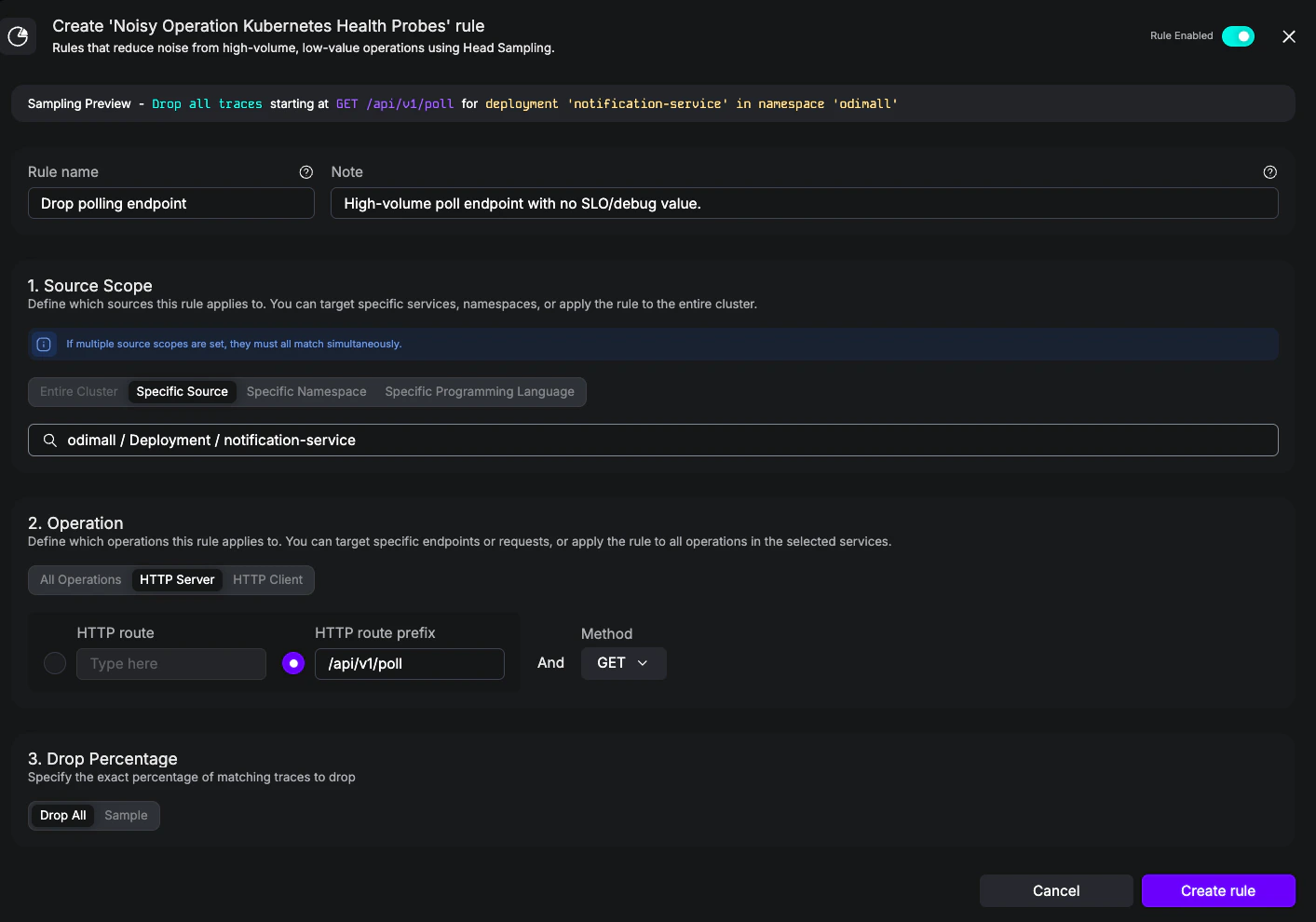
**Goal:** Drop traces for a high-volume polling endpoint (`/api/v1/poll`) that produces many traces but is not useful for debugging or SLOs. This is a typical **Noisy** rule for traffic that's neither a Kubernetes probe nor a metrics scrape, but is still pure noise.
Create a Noisy rule with:
* **Name:** `Drop polling endpoint`
* **Notes:** `High-volume poll endpoint with no SLO/debug value.`
* **Source scope:** Specific Source = `odimall / Deployment / notification-service`
* **Operation:** HTTP Server, route prefix `/api/v1/poll`, method **GET**
* **Drop Percentage:** Drop All
```yaml drop-poll-endpoint.yaml theme={null}
apiVersion: odigos.io/v1alpha1
kind: Sampling
metadata:
name: drop-poll-endpoint
namespace: odigos-system
spec:
name: Drop /api/v1/poll
noisyOperations:
- name: Drop polling endpoint
notes: High-volume poll endpoint with no SLO/debug value.
percentageAtMost: 0
sourceScopes:
- workloadNamespace: odimall
workloadKind: Deployment
workloadName: notification-service
operation:
httpServer:
routePrefix: /api/v1/poll
method: GET
```
## 2. Keep slow requests at 100%
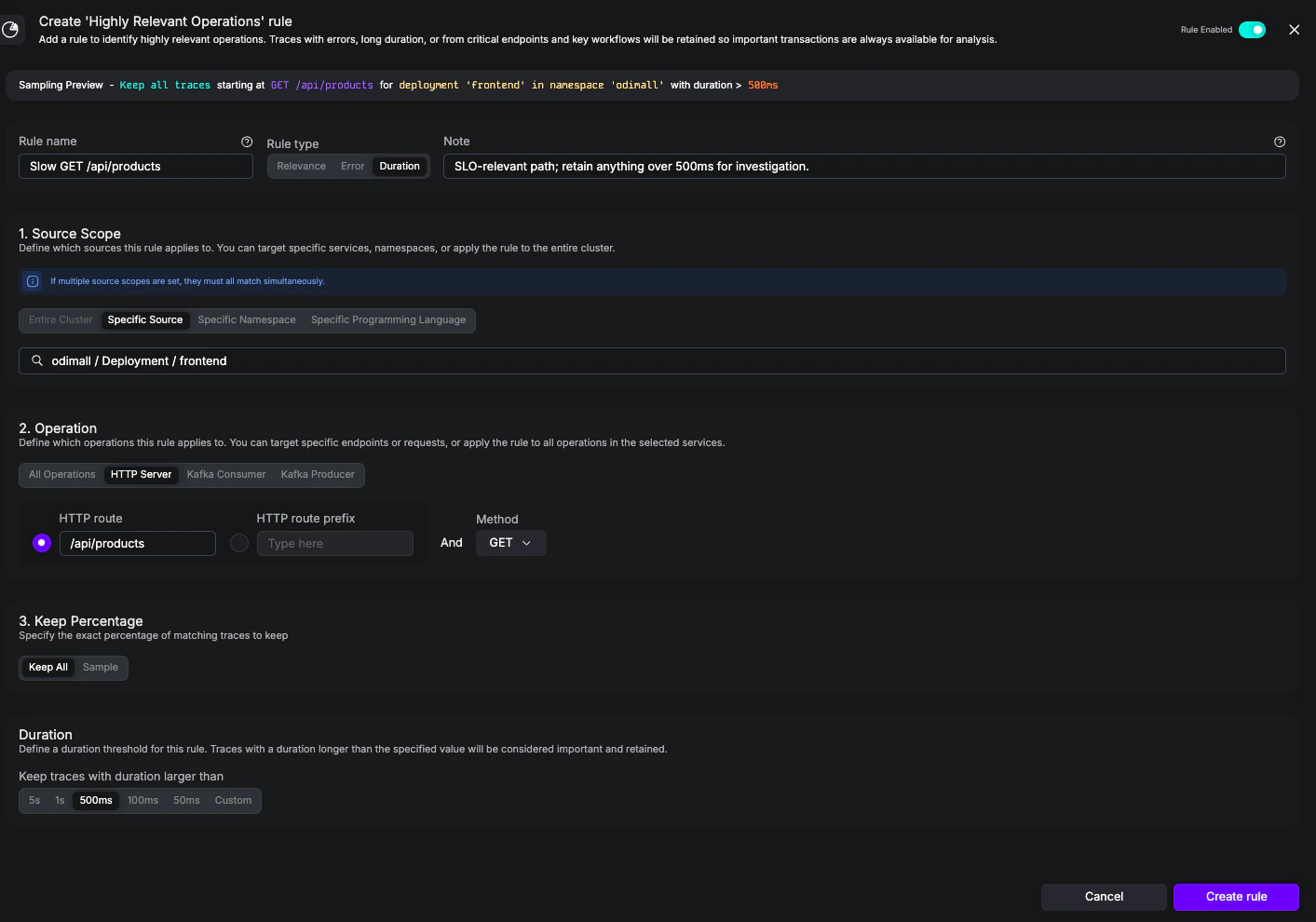
**Goal:** Always retain traces for `GET /api/products` whenever they take longer than 500 ms. This is a **Highly Relevant** duration rule—a complement to the built-in [Keep All Error Traces](./rules/highly-relevant#built-in-rule-keep-all-error-traces) rule, focused on latency rather than errors.
Create a Highly Relevant rule with:
* **Name:** `Slow GET /api/products`
* **Notes:** `SLO-relevant path; retain anything over 500ms for investigation.`
* **Rule Type:** Duration
* **Source scope:** Specific Source = `odimall / Deployment / frontend`
* **Operation:** HTTP Server, route `/api/products`, method **GET**
* **Keep Percentage:** Keep All
* **Duration:** 500ms
```yaml keep-slow-products.yaml theme={null}
apiVersion: odigos.io/v1alpha1
kind: Sampling
metadata:
name: keep-slow-products
namespace: odigos-system
spec:
name: Keep slow product reads
highlyRelevantOperations:
- name: Slow GET /api/products
notes: SLO-relevant path; retain anything over 500ms for investigation.
durationAtLeastMs: 500
percentageAtLeast: 100
sourceScopes:
- workloadNamespace: odimall
workloadKind: Deployment
workloadName: frontend
operation:
httpServer:
route: /api/products
method: GET
```
## 3. Apply a cluster-wide 5% baseline
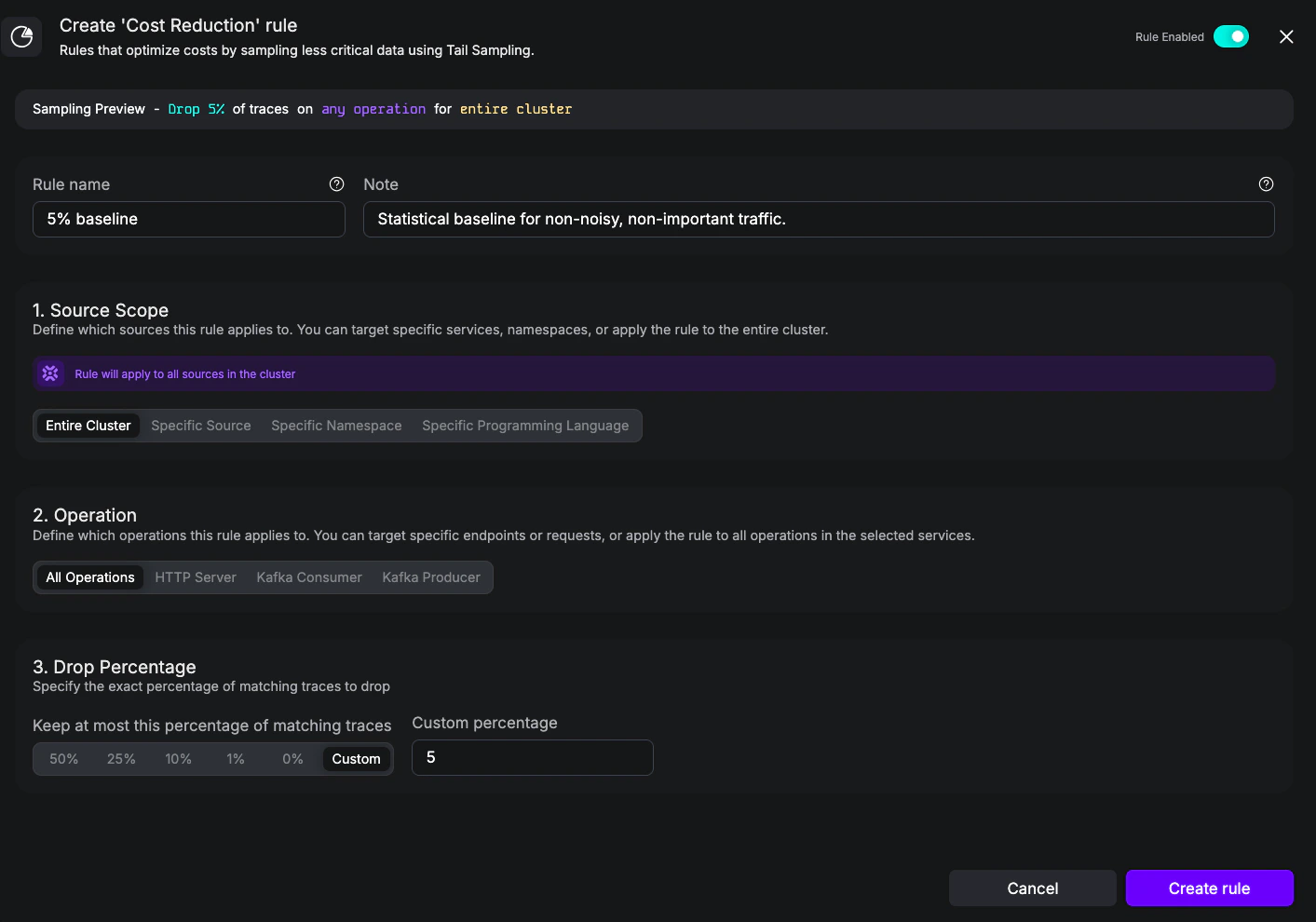
**Goal:** Keep 5% of all cluster traffic as a statistical baseline, regardless of source or operation. This is the same shape as the built-in [Drop Traces Cluster-Wide](./rules/cost-reduction#built-in-rule-drop-traces-cluster-wide) rule and is the simplest way to cut volume after Noisy and Highly Relevant rules have run.
Create a Cost Reduction rule with:
* **Name:** `5% baseline`
* **Notes:** `Statistical baseline for non-noisy, non-important traffic.`
* **Source scope:** Entire cluster
* **Operation:** All Operations
* **Drop Percentage:** 5
```yaml baseline-cluster-sample.yaml theme={null}
apiVersion: odigos.io/v1alpha1
kind: Sampling
metadata:
name: baseline-cluster-sample
namespace: odigos-system
spec:
name: Cluster baseline 5%
costReductionRules:
- name: 5% baseline
notes: Statistical baseline for non-noisy, non-important traffic.
percentageAtMost: 5
```
Cost Reduction rules with **no** Operation block apply to every operation in the scope. Combine with Highly Relevant rules to make sure error and latency traces survive the cap—Highly Relevant always wins over Cost Reduction.
## 4. Scope a rule to namespace and language
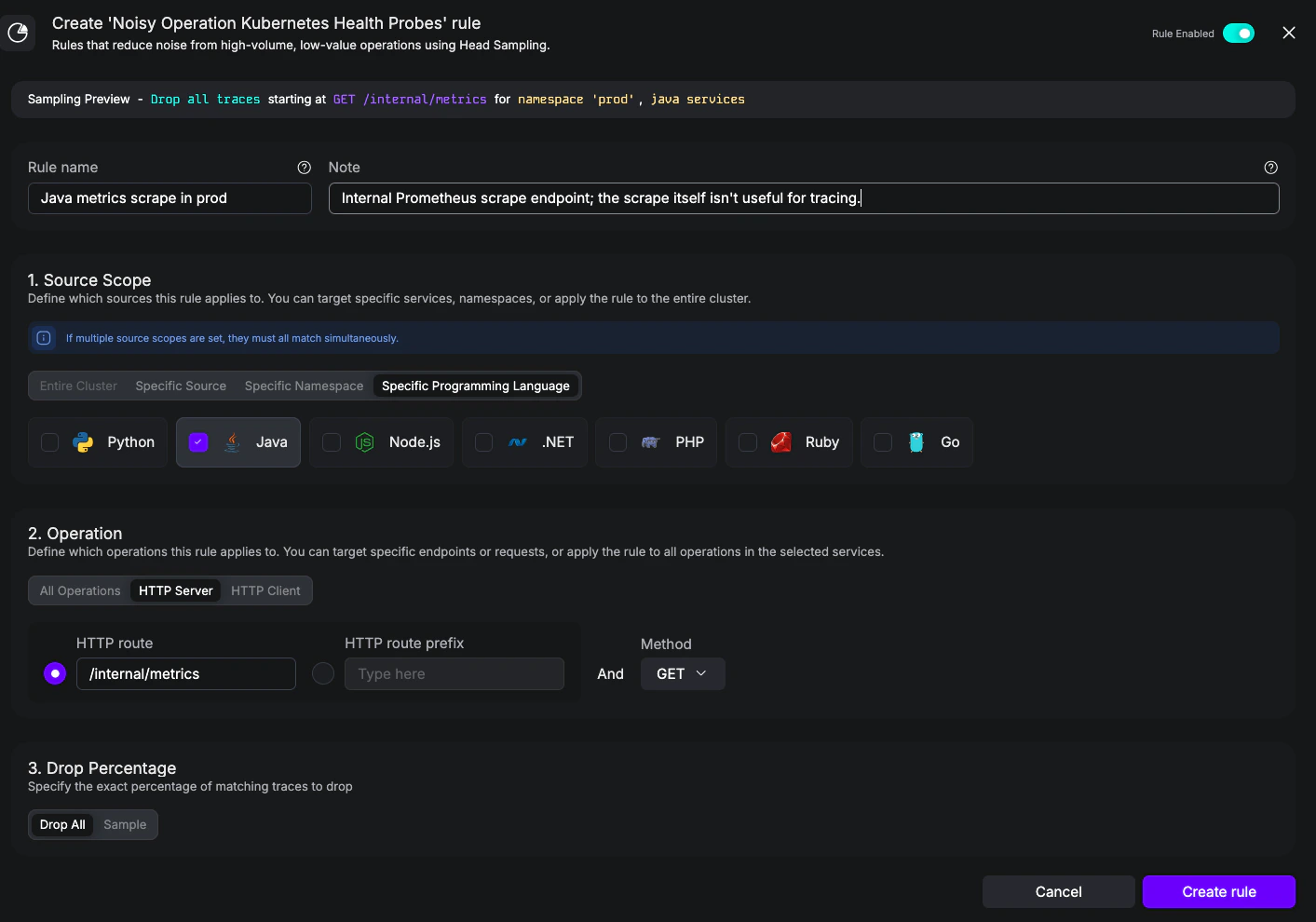
**Goal:** Drop scrape traffic to `/internal/metrics` for **Java** workloads in the `prod` namespace only—leave other namespaces and other languages untouched. This example demonstrates the **AND** semantics across scope types: a single source scope item with both `workloadNamespace` and `workloadLanguage` set.
Create a Noisy rule with:
* **Name:** `Java metrics scrape in prod`
* **Notes:** `Internal Prometheus scrape endpoint; the scrape itself isn't useful for tracing.`
* **Source scope:** Specific Namespace = `prod` **and** Specific Programming Language = **Java**
* **Operation:** HTTP Server, route `/internal/metrics`, method **GET**
* **Drop Percentage:** Drop All
```yaml drop-metrics-java-prod.yaml theme={null}
apiVersion: odigos.io/v1alpha1
kind: Sampling
metadata:
name: drop-metrics-java-prod
namespace: odigos-system
spec:
name: Drop /internal/metrics (Java in prod)
noisyOperations:
- name: Java metrics scrape in prod
notes: Internal Prometheus scrape endpoint; the scrape itself isn't useful for tracing.
percentageAtMost: 0
sourceScopes:
- workloadNamespace: prod
workloadLanguage: java
operation:
httpServer:
route: /internal/metrics
method: GET
```
Source scope combines in two layers:
* **Different categories must all match.** This rule sets Specific Namespace = `prod` together with Specific Programming Language = `java`, so a workload has to be in `prod` **and** be a Java workload. In YAML that maps to a single `sourceScopes` item with both fields set on it.
* **Multiple values inside one category are alternatives.** Setting the namespace category to `prod` and `staging` would match a Java workload in either one. In YAML that maps to multiple `sourceScopes` items, each carrying just the namespace field.
## 5. Combine Highly Relevant and Cost Reduction
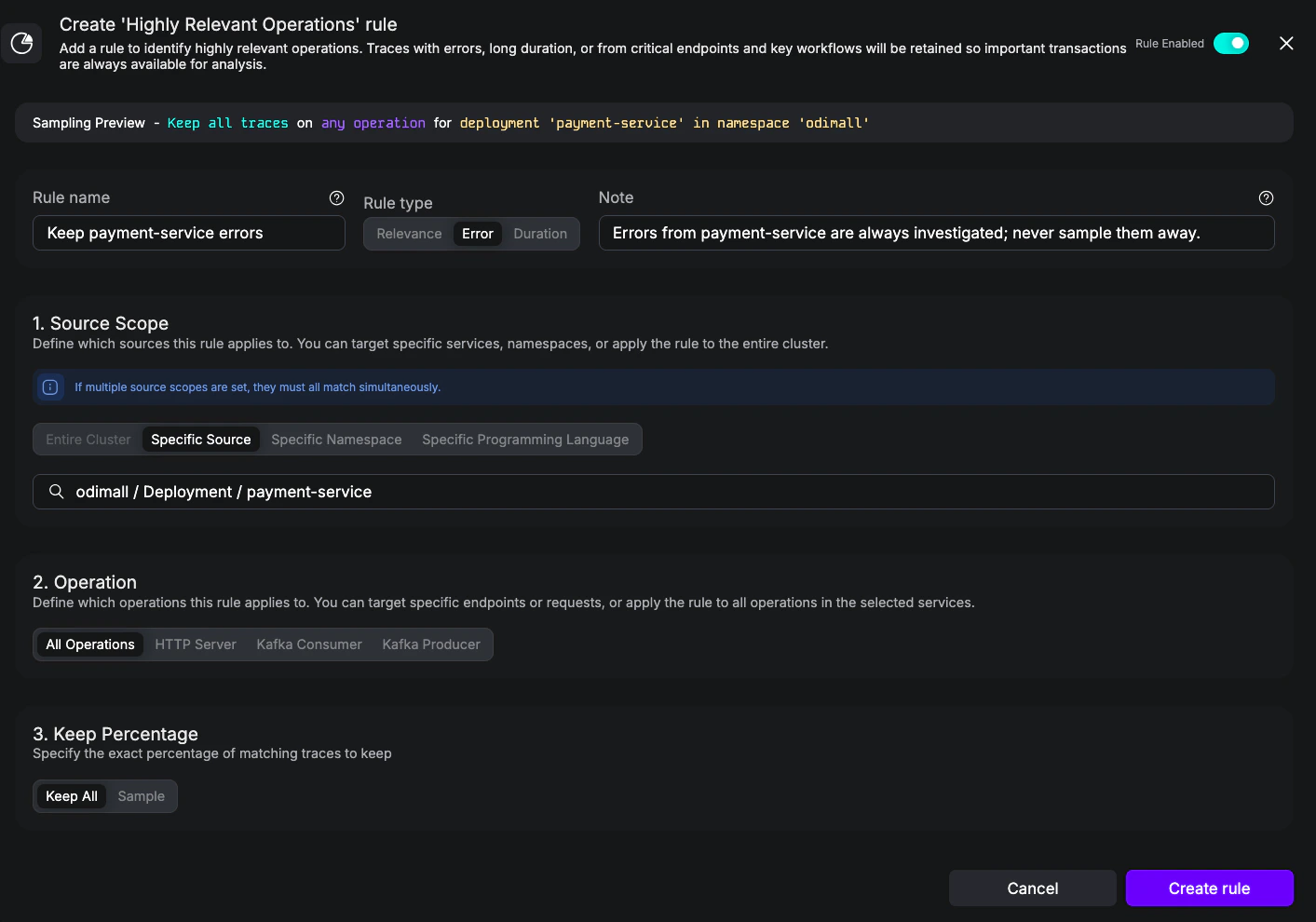
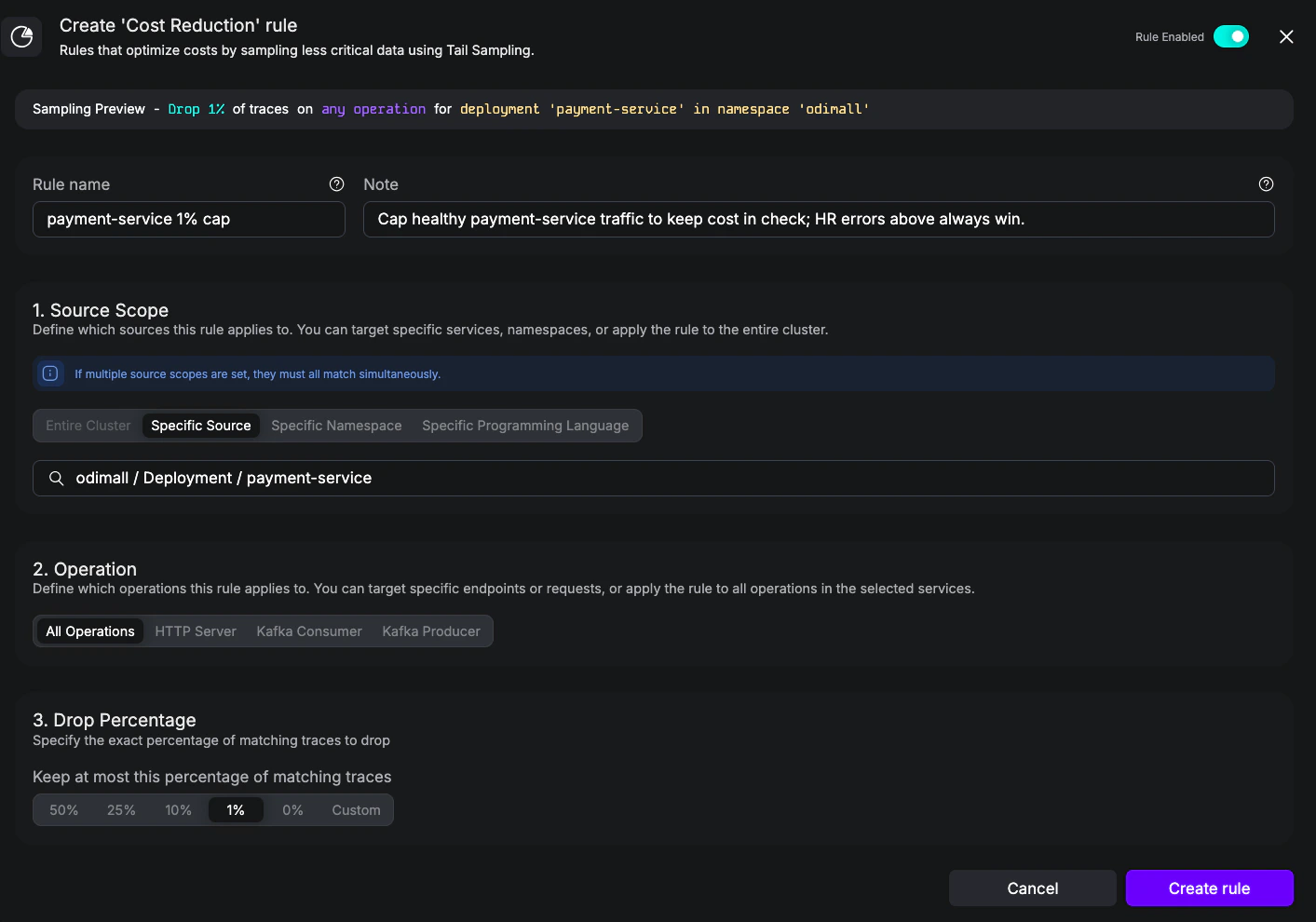
**Goal:** A `payment-service` where **every error trace** must be kept (Highly Relevant) and **all other traffic** is capped at 1% (Cost Reduction). This is the canonical "keep what matters, sample the rest" pattern, expressed in a single `Sampling` object that bundles both categories together.
Create two rules:
**1. Highly Relevant**
* **Name:** `Keep payment-service errors`
* **Notes:** `Errors from payment-service are always investigated; never sample them away.`
* **Rule Type:** Error
* **Source scope:** Specific Source = `odimall / Deployment / payment-service`
* **Operation:** All Operations
* **Keep Percentage:** Keep All
**2. Cost Reduction**
* **Name:** `payment-service 1% cap`
* **Notes:** `Cap healthy payment-service traffic to keep cost in check; HR errors above always win.`
* **Source scope:** Specific Source = `odimall / Deployment / payment-service`
* **Operation:** All Operations
* **Drop Percentage:** 1%
```yaml payment-service-policy.yaml theme={null}
apiVersion: odigos.io/v1alpha1
kind: Sampling
metadata:
name: payment-service-policy
namespace: odigos-system
spec:
name: payment-service policy
notes: Always keep errors; cap healthy traffic at 1%.
highlyRelevantOperations:
- name: Keep payment-service errors
notes: Errors from payment-service are always investigated; never sample them away.
error: true
percentageAtLeast: 100
sourceScopes:
- workloadNamespace: odimall
workloadKind: Deployment
workloadName: payment-service
costReductionRules:
- name: payment-service 1% cap
notes: Cap healthy payment-service traffic to keep cost in check; HR errors above always win.
percentageAtMost: 1
sourceScopes:
- workloadNamespace: odimall
workloadKind: Deployment
workloadName: payment-service
```
A trace from `payment-service` that contains any error span is kept at 100% by the Highly Relevant rule. A trace with no errors falls through to the Cost Reduction cap of 1%. Both rules are evaluated for every matching trace; Highly Relevant's keep percentage wins when both apply. See [Evaluation between Highly Relevant and Cost Reduction](./rules/overview#evaluation-between-highly-relevant-and-cost-reduction-categories).
## 6. Drop noisy gRPC health checks
**Goal:** Drop standard gRPC liveness/readiness checks (`grpc.health.v1.Health.Check`, `Watch`, ...) on the `inventory` Deployment. This is the gRPC counterpart of [Example 1](#1-drop-a-noisy-custom-endpoint), and shows how setting `service` alone scopes a rule to every method of a whole gRPC service.
```yaml drop-grpc-health-checks.yaml theme={null}
apiVersion: odigos.io/v1alpha1
kind: Sampling
metadata:
name: drop-grpc-health-checks
namespace: odigos-system
spec:
name: Drop gRPC health checks
noisyOperations:
- name: Drop gRPC health checks
notes: Standard liveness/readiness pings; not useful for tracing.
percentageAtMost: 0
sourceScopes:
- workloadNamespace: odimall
workloadKind: Deployment
workloadName: inventory
operation:
grpcServer:
service: grpc.health.v1.Health
```
Because `service` and `method` are independent, a single `service:` line filters every method on a service. Add `method: ListItems` to scope to one specific RPC instead, or combine with `grpcClient.serverAddress` to drop outgoing calls to a particular backend.
## YAML reference notes
A few details that aren't obvious from YAML alone but matter when authoring rules. The full schema—every field, type, and validation rule—is in the [`Sampling` API reference](../../../api-reference/odigos.io.v1alpha1#odigos-io-v1alpha1-Sampling).
The YAML enum for `workloadLanguage` uses lowercase identifiers: `java`, `python`, `go`, `dotnet`, `javascript`, `php`, `ruby`. The UI displays the friendly names (Java, Python, Go, .Net, NodeJS, PHP, Ruby).
`workloadKind` must match the Kubernetes resource kind exactly (case-sensitive PascalCase): `Deployment`, `StatefulSet`, `DaemonSet`, `Job`, `CronJob`. Lowercase or pluralized values will silently fail to match.
Empty or missing fields don't mean "match nothing"—each one has a default that often biases toward broader matching:
* **`sourceScopes` empty or absent** — the rule matches **every** source.
* **`operation` omitted** — the rule matches **every** operation in the scope.
* **Noisy `percentageAtMost` omitted** — defaults to **0%** (drops everything).
* **Highly Relevant `percentageAtLeast` omitted** — defaults to **100%** (keeps everything).
* **Cost Reduction `percentageAtMost`** — **required**. There is no default; the resource will fail validation if the field is absent.
* On HTTP Server matchers, set **either** `route` (exact match) **or** `routePrefix` (prefix match)—not both. Both match the framework's **templated path** (e.g., `/users/{id}`, `/users/:id`, `/users/*`), not the resolved URL.
* `method` is a free-form string in YAML. The UI restricts it to GET, POST, PATCH, DELETE, and PUT, but YAML accepts any method (e.g., HEAD, OPTIONS). Leave it empty to match any method.
* HTTP Client matchers (Noisy only) use `templatedPath` / `templatedPathPrefix`—the framework's parameterized path (e.g., `/users/{id}`), **not** the resolved URL (e.g., `/users/42`). Match against the route as your HTTP library reports it.
* `service` matches the fully-qualified gRPC service name (e.g., `acme.inventory.v1.InventoryService`, `grpc.health.v1.Health`); `method` matches the bare method name (e.g., `ListItems`, `Check`). Both fields are **exact match** and **case-sensitive**, mirroring proto naming.
* The canonical "drop every call to this service" rule is one line: set `service` and leave `method` empty. To target a single RPC, set both. To match every gRPC call regardless of service, leave both empty.
* Both OpenTelemetry semconv conventions are supported transparently: the older split form (`rpc.service` + bare `rpc.method`) and the newer fully-qualified form (`rpc.method` = `"Service/method"`, with `rpc.service` deprecated). For the latter the matcher splits `rpc.method` on the first `/` to derive the service/method, so the same rule matches spans from agents on either version.
* The `rpc.*` attribute namespace is shared with other RPC frameworks (Apache Dubbo, Connect RPC, JSON-RPC, .NET WCF, Java RMI, ONC RPC). The matcher reads `rpc.system` / `rpc.system.name` and, when present, only matches spans whose system equals `"grpc"`; non-gRPC RPC spans never accidentally fire a gRPC rule. Spans that omit `rpc.system` entirely are still considered (permissive default for older instrumentations).
* A span must carry at least `rpc.service` **or** `rpc.method` to be considered a gRPC span; rules on an attribute that can't be derived from the span will not match (e.g. a `service:` rule against a span whose only RPC attribute is the bare-method `rpc.method` or the `_OTHER` sentinel).
* gRPC Client matchers (Noisy only) additionally support `serverAddress` for matching the remote host (the gRPC channel target). Leave it empty to match any address.
Leaving `kafkaTopic` empty on a `kafkaConsumer` or `kafkaProducer` matcher matches **every** topic for that direction. Set the topic explicitly to scope a Kafka rule to a specific stream.
Setting both `error: true` and `durationAtLeastMs` on a single `highlyRelevantOperations` item is an **AND**—the span must be an error **and** longer than the threshold to match. For "errors **or** slow," use two separate items in the `highlyRelevantOperations` array.
The rule `name` is written as a **metric attribute** and stored as a **span attribute** on participating spans, so use a value that's safe for dashboards and queries—avoid PII or characters your backend doesn't index well.
`disabled: true` (per rule, or `spec.disabled` for the entire `Sampling` object) removes the rule from sampling decisions but **still emits metrics** for it. That's useful for tuning a rule and observing its would-be impact before re-enabling it, rather than deleting it outright.
## Applying YAML rules
You can apply any of the YAML examples above with `kubectl`, or commit them to your GitOps repository alongside the rest of your Odigos configuration:
```bash theme={null}
kubectl apply -f drop-poll-endpoint.yaml
```
Each `Sampling` resource is a self-contained group of rules. You can split rules across multiple `Sampling` objects—by team, environment, or use case—and they will be **joined together** to form the global sampling policy.
```bash theme={null}
kubectl get samplings.odigos.io -n odigos-system
```
### Disabling a rule
To take a rule out of sampling decisions without deleting it, you can either flip the toggle in the UI or set `disabled: true` in YAML. Disabled rules **still emit sampling metrics**, so you can observe what the rule would have done before re-enabling it—useful as a "soft delete" while tuning, rather than removing the rule outright. See [Enabled](./configuration#enabled) for when to reach for this versus deleting the rule.
Each rule's detail view has a toggle in the top-right corner that flips its label between **Rule Enabled** and **Rule Disabled**. Slide it off to take the rule out of sampling decisions immediately; slide it back on to re-enable. The toggle is **per rule**—other rules in the same `Sampling` object continue to apply.
The `disabled` flag exists at two levels:
* **Per rule** — set `disabled: true` on an individual entry in `noisyOperations`, `highlyRelevantOperations`, or `costReductionRules`. The other rules in the same `Sampling` object continue to apply. This is what the UI toggle writes.
* **Per `Sampling` object** — set `spec.disabled: true` on the resource. Every rule in that object is taken out of decisions in one step, leaving rules in other `Sampling` objects untouched.
```yaml disable-a-rule.yaml theme={null}
apiVersion: odigos.io/v1alpha1
kind: Sampling
metadata:
name: payment-service-policy
namespace: odigos-system
spec:
name: payment-service policy
costReductionRules:
- name: payment-service 1% cap
notes: Cap healthy payment-service traffic to keep cost in check; HR errors above always win.
disabled: true
percentageAtMost: 1
sourceScopes:
- workloadNamespace: odimall
workloadKind: Deployment
workloadName: payment-service
```
The examples on this page cover the most common shapes; the [`Sampling` API reference](../../../api-reference/odigos.io.v1alpha1#odigos-io-v1alpha1-Sampling) is the source of truth for every field, type, validation rule, and default on the CRD. Use it when you're extending an example or building a rule that doesn't fit one of the patterns above.