> ## Documentation Index
> Fetch the complete documentation index at: https://docs.odigos.io/llms.txt
> Use this file to discover all available pages before exploring further.
# Datadog
> Configuring the Datadog backend (Managed)
### Getting Started
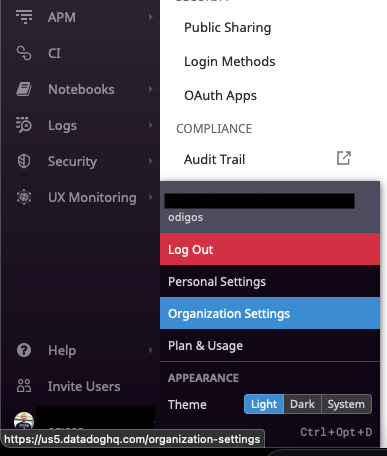
 On the left sidebar, click on your username and then click on **Organization Settings**
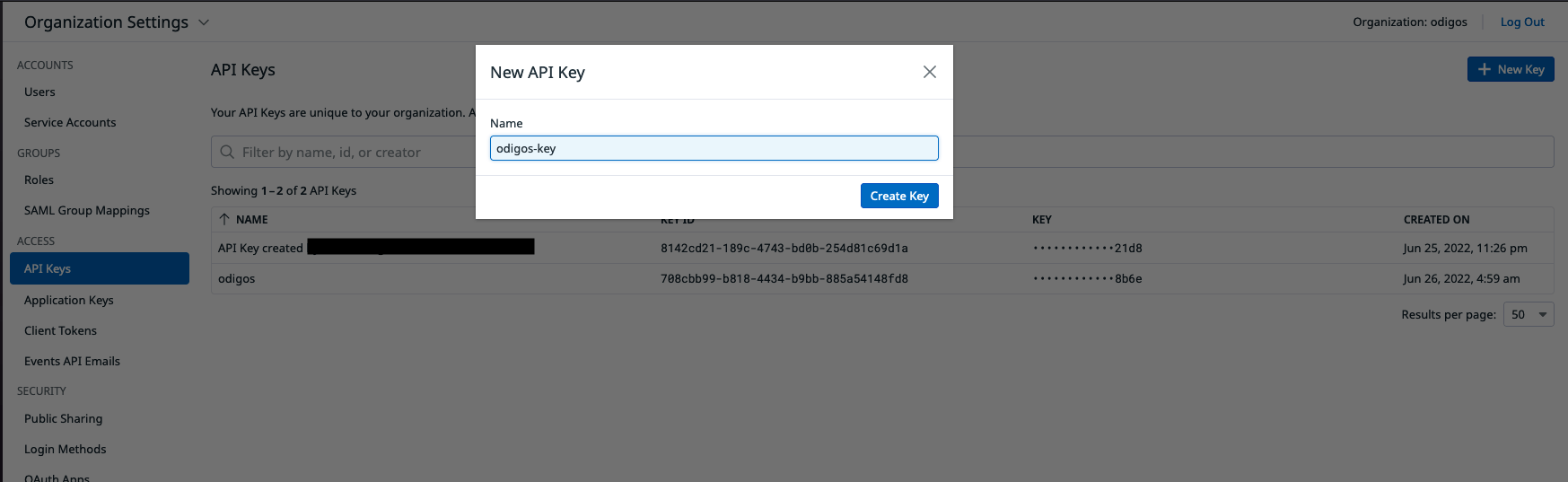
 Click on **API Keys** and then click on **New Key** and give it a name.
 ### Configuring Destination Fields
✅ Traces
✅ Metrics
✅ Logs
❌ Profiles
* **DATADOG\_API\_KEY** `string` : API Key. The API key for your Datadog account.
* This field is required
* **DATADOG\_SITE** `string` : Site. The datadog site you are using (the url of the datadog site you are using).
* This field is required
### Adding Destination to Odigos
There are two primary methods for configuring destinations in Odigos:
##### **Using the UI**
Use the [Odigos CLI](https://docs.odigos.io/cli/odigos_ui) to access the UI
```bash theme={null}
odigos ui
```
Click on `Add Destination`, select `Datadog` and follow the on-screen instructions
##### **Using Kubernetes manifests**
Save the YAML below to a file (e.g. `datadog.yaml`)
```yaml theme={null}
apiVersion: odigos.io/v1alpha1
kind: Destination
metadata:
name: datadog-example
namespace: odigos-system
spec:
data:
DATADOG_SITE: ''
destinationName: datadog
secretRef:
name: datadog-secret
signals:
- TRACES
- METRICS
- LOGS
type: datadog
---
apiVersion: v1
data:
DATADOG_API_KEY:
kind: Secret
metadata:
name: datadog-secret
namespace: odigos-system
type: Opaque
```
Apply the YAML using `kubectl`
```bash theme={null}
kubectl apply -f datadog.yaml
```
### Configuring Destination Fields
✅ Traces
✅ Metrics
✅ Logs
❌ Profiles
* **DATADOG\_API\_KEY** `string` : API Key. The API key for your Datadog account.
* This field is required
* **DATADOG\_SITE** `string` : Site. The datadog site you are using (the url of the datadog site you are using).
* This field is required
### Adding Destination to Odigos
There are two primary methods for configuring destinations in Odigos:
##### **Using the UI**
Use the [Odigos CLI](https://docs.odigos.io/cli/odigos_ui) to access the UI
```bash theme={null}
odigos ui
```
Click on `Add Destination`, select `Datadog` and follow the on-screen instructions
##### **Using Kubernetes manifests**
Save the YAML below to a file (e.g. `datadog.yaml`)
```yaml theme={null}
apiVersion: odigos.io/v1alpha1
kind: Destination
metadata:
name: datadog-example
namespace: odigos-system
spec:
data:
DATADOG_SITE: ''
destinationName: datadog
secretRef:
name: datadog-secret
signals:
- TRACES
- METRICS
- LOGS
type: datadog
---
apiVersion: v1
data:
DATADOG_API_KEY:
kind: Secret
metadata:
name: datadog-secret
namespace: odigos-system
type: Opaque
```
Apply the YAML using `kubectl`
```bash theme={null}
kubectl apply -f datadog.yaml
```