

Sampling resource (the same CRD applied via kubectl apply or GitOps). Use these as starting points and adjust scope, operations, and percentages to match your environment.
Sampling CRD schema. The screenshots for each scenario reflect the live UI; minor styling may shift between releases.Sampling CRD (odigos.io/v1alpha1). For every field, type, validation rule, and default—including options not covered by the examples below—see the Sampling API reference.1. Drop a noisy custom endpoint
Goal: Drop traces for a high-volume polling endpoint (/api/v1/poll) that produces many traces but is not useful for debugging or SLOs. This is a typical Noisy rule for traffic that’s neither a Kubernetes probe nor a metrics scrape, but is still pure noise.
- UI
- YAML
- Name:
Drop polling endpoint - Notes:
High-volume poll endpoint with no SLO/debug value. - Source scope: Specific Source =
odimall / Deployment / notification-service - Operation: HTTP Server, route prefix
/api/v1/poll, method GET - Drop Percentage: Drop All
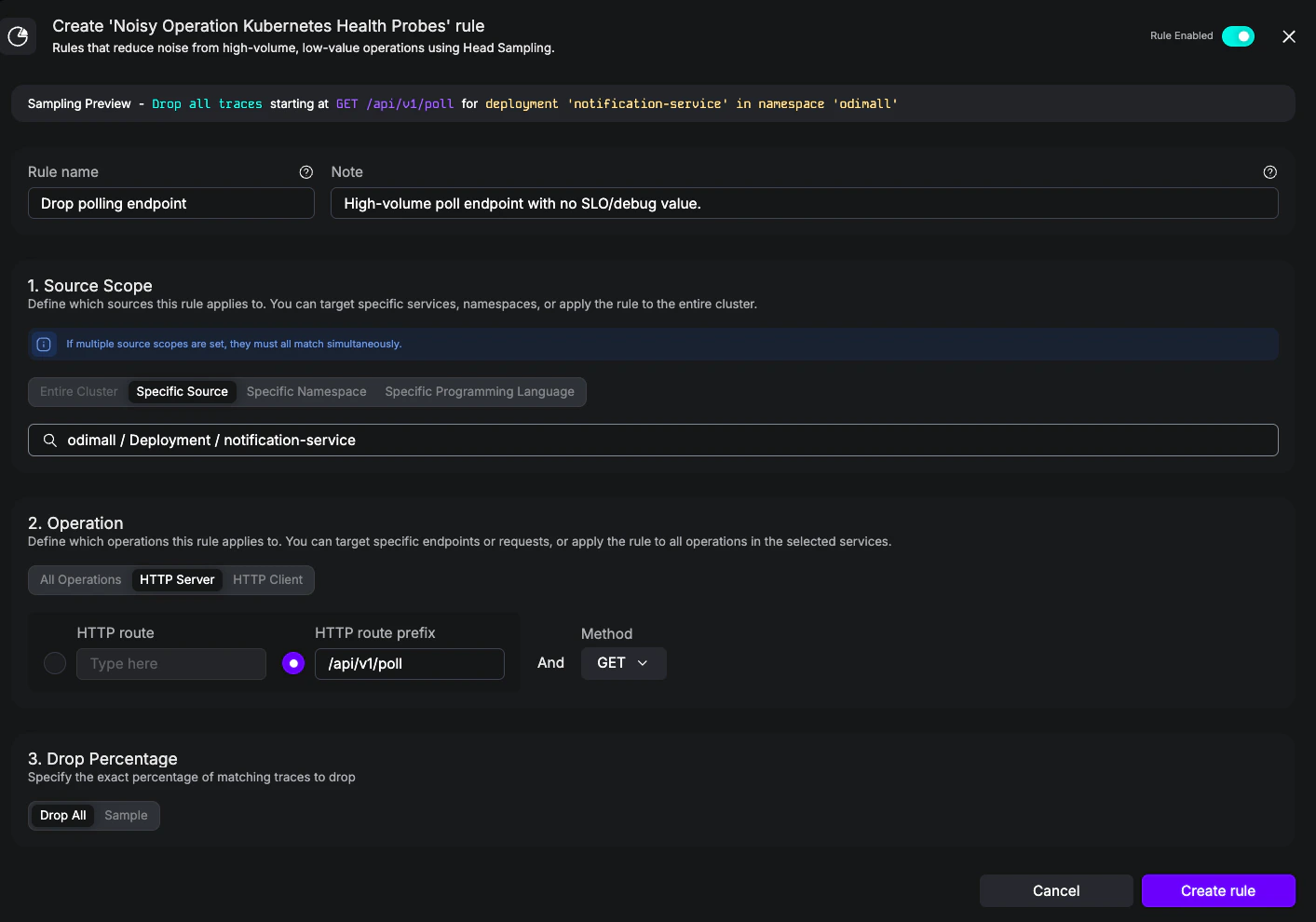
Noisy rule dropping GET traces for /api/v1/poll on the notification-service Deployment.
2. Keep slow requests at 100%
Goal: Always retain traces forGET /api/products whenever they take longer than 500 ms. This is a Highly Relevant duration rule—a complement to the built-in Keep All Error Traces rule, focused on latency rather than errors.
- UI
- YAML
- Name:
Slow GET /api/products - Notes:
SLO-relevant path; retain anything over 500ms for investigation. - Rule Type: Duration
- Source scope: Specific Source =
odimall / Deployment / frontend - Operation: HTTP Server, route
/api/products, method GET - Keep Percentage: Keep All
- Duration: 500ms
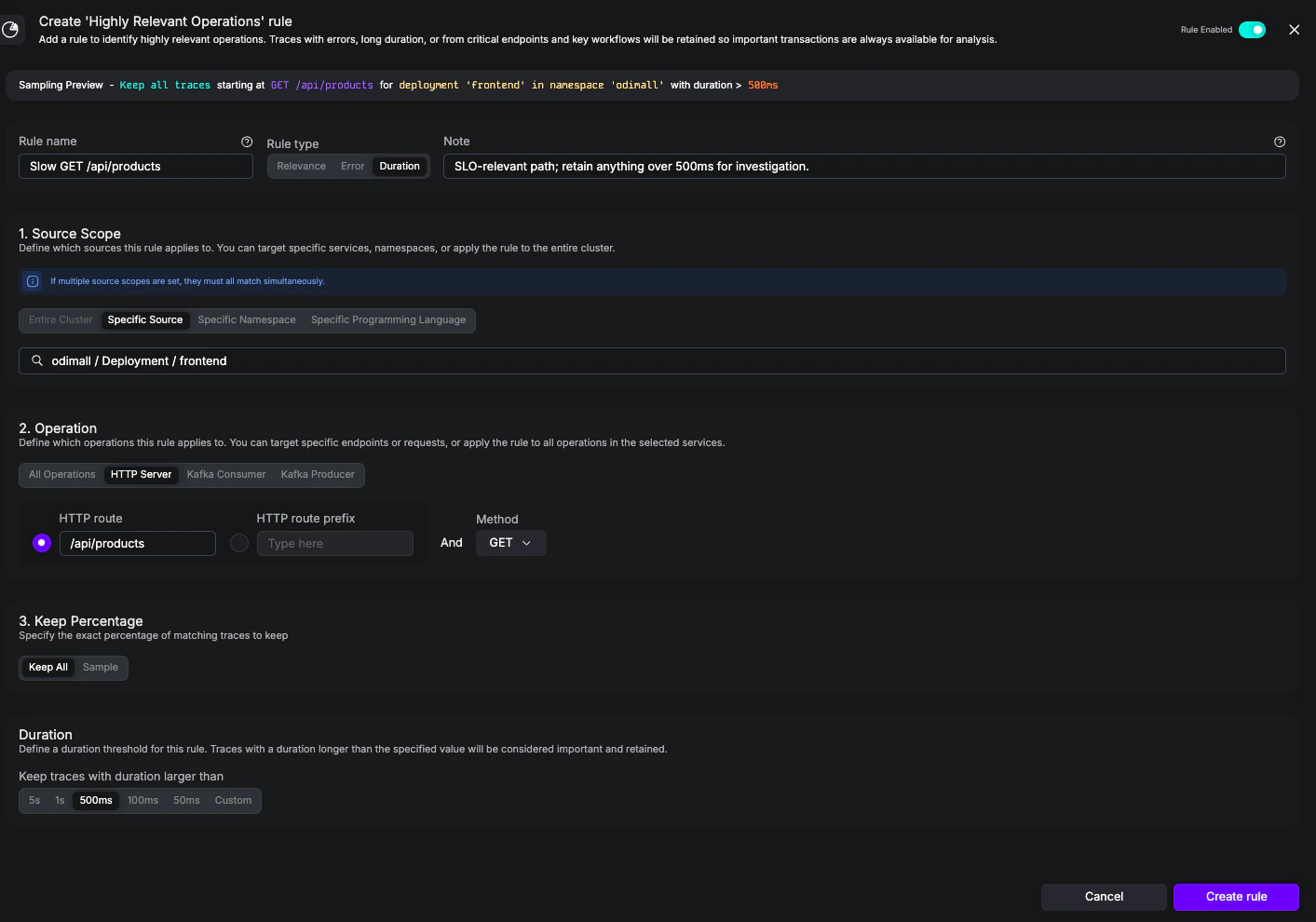
Highly Relevant rule keeping all GET /api/products traces longer than 500 ms on the frontend Deployment.
3. Apply a cluster-wide 5% baseline
Goal: Keep 5% of all cluster traffic as a statistical baseline, regardless of source or operation. This is the same shape as the built-in Drop Traces Cluster-Wide rule and is the simplest way to cut volume after Noisy and Highly Relevant rules have run.- UI
- YAML
- Name:
5% baseline - Notes:
Statistical baseline for non-noisy, non-important traffic. - Source scope: Entire cluster
- Operation: All Operations
- Drop Percentage: 5
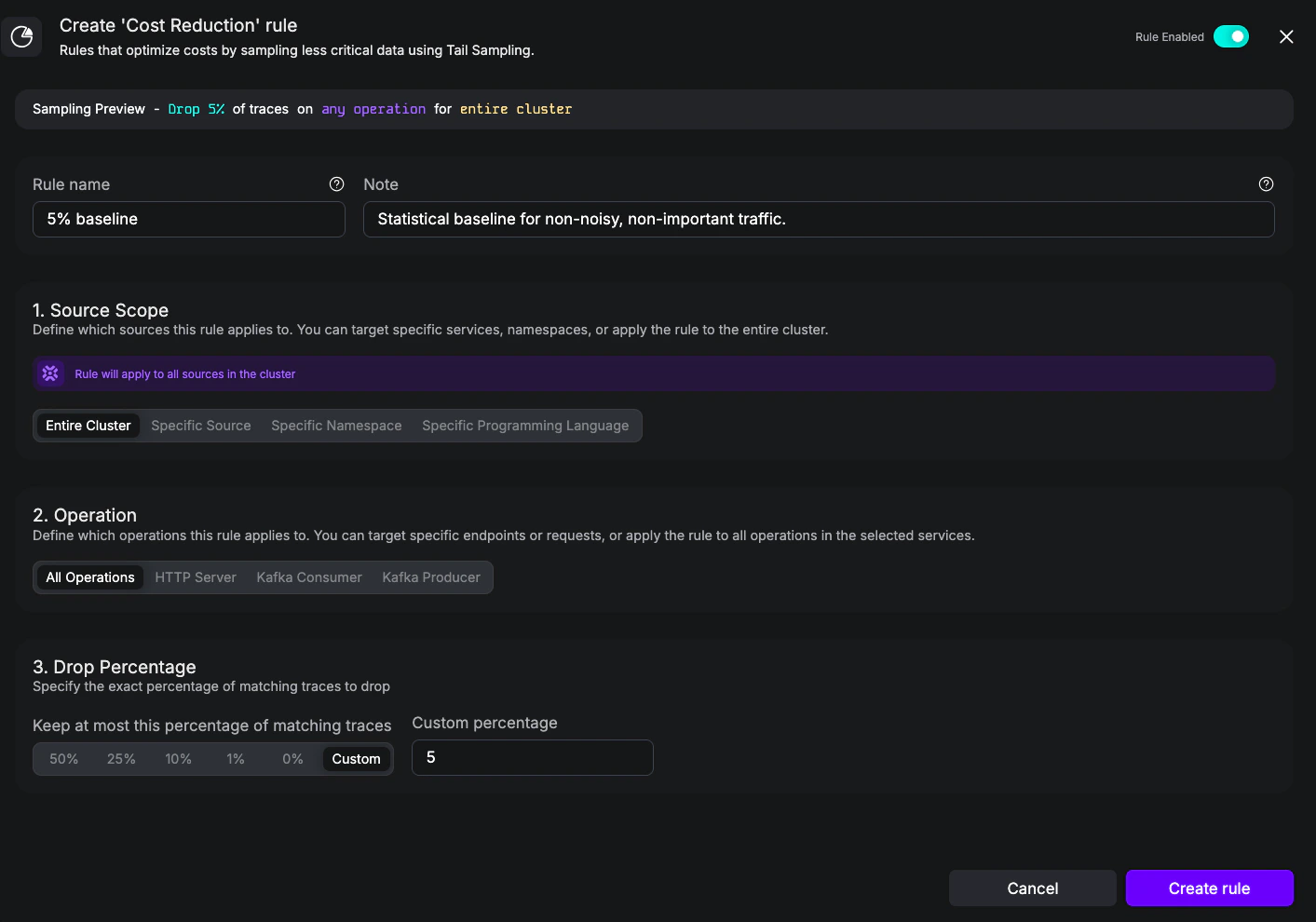
Cost Reduction rule keeping at most 5% of all cluster traffic.
4. Scope a rule to namespace and language
Goal: Drop scrape traffic to/internal/metrics for Java workloads in the prod namespace only—leave other namespaces and other languages untouched. This example demonstrates the AND semantics across scope types: a single source scope item with both workloadNamespace and workloadLanguage set.
- UI
- YAML
- Name:
Java metrics scrape in prod - Notes:
Internal Prometheus scrape endpoint; the scrape itself isn't useful for tracing. - Source scope: Specific Namespace =
prodand Specific Programming Language = Java - Operation: HTTP Server, route
/internal/metrics, method GET - Drop Percentage: Drop All
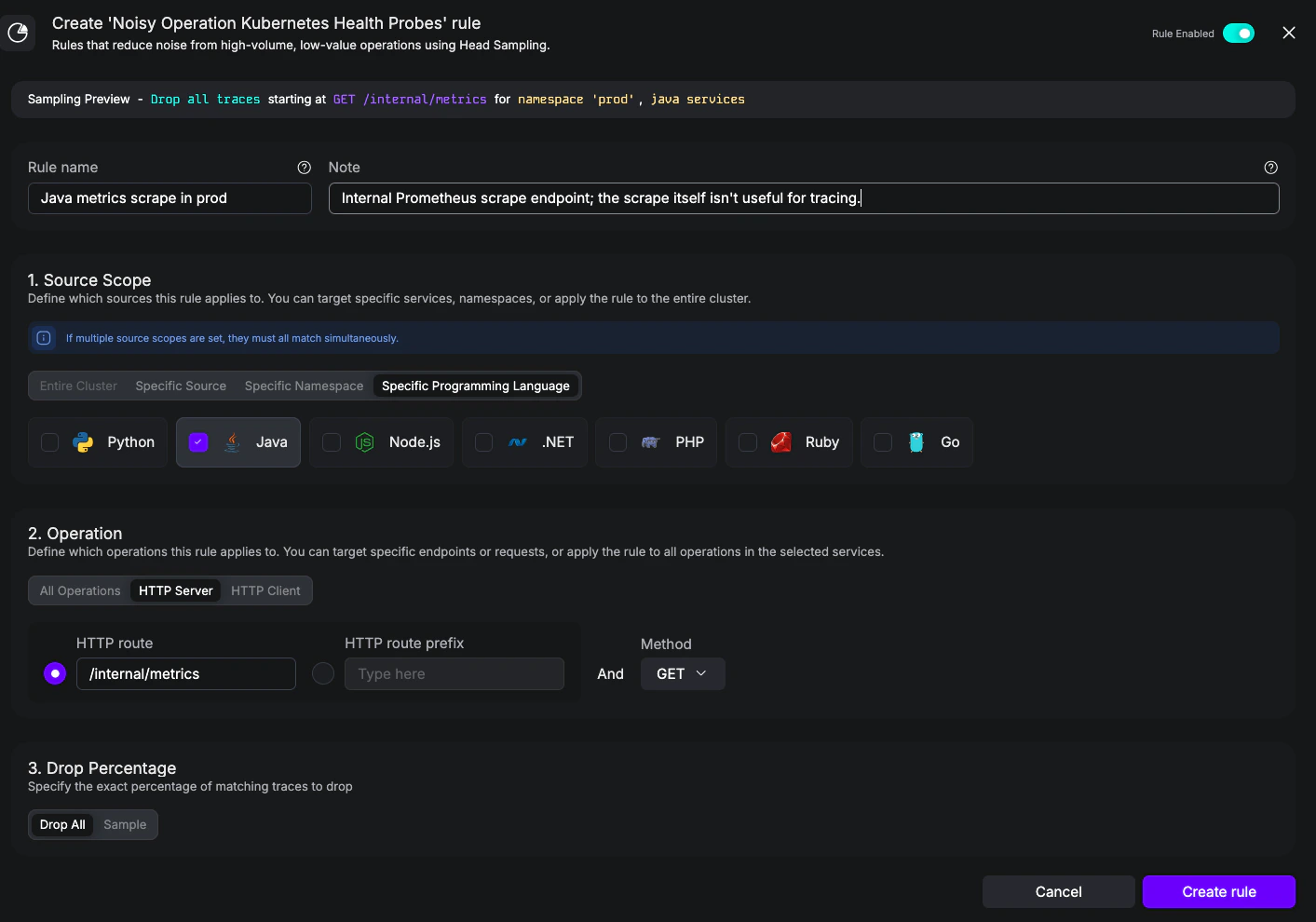
Noisy rule scoped to Java workloads in the prod namespace.
- Different categories must all match. This rule sets Specific Namespace =
prodtogether with Specific Programming Language =java, so a workload has to be inprodand be a Java workload. In YAML that maps to a singlesourceScopesitem with both fields set on it. - Multiple values inside one category are alternatives. Setting the namespace category to
prodandstagingwould match a Java workload in either one. In YAML that maps to multiplesourceScopesitems, each carrying just the namespace field.
5. Combine Highly Relevant and Cost Reduction
Goal: Apayment-service where every error trace must be kept (Highly Relevant) and all other traffic is capped at 1% (Cost Reduction). This is the canonical “keep what matters, sample the rest” pattern, expressed in a single Sampling object that bundles both categories together.
- UI
- YAML
- Name:
Keep payment-service errors - Notes:
Errors from payment-service are always investigated; never sample them away. - Rule Type: Error
- Source scope: Specific Source =
odimall / Deployment / payment-service - Operation: All Operations
- Keep Percentage: Keep All
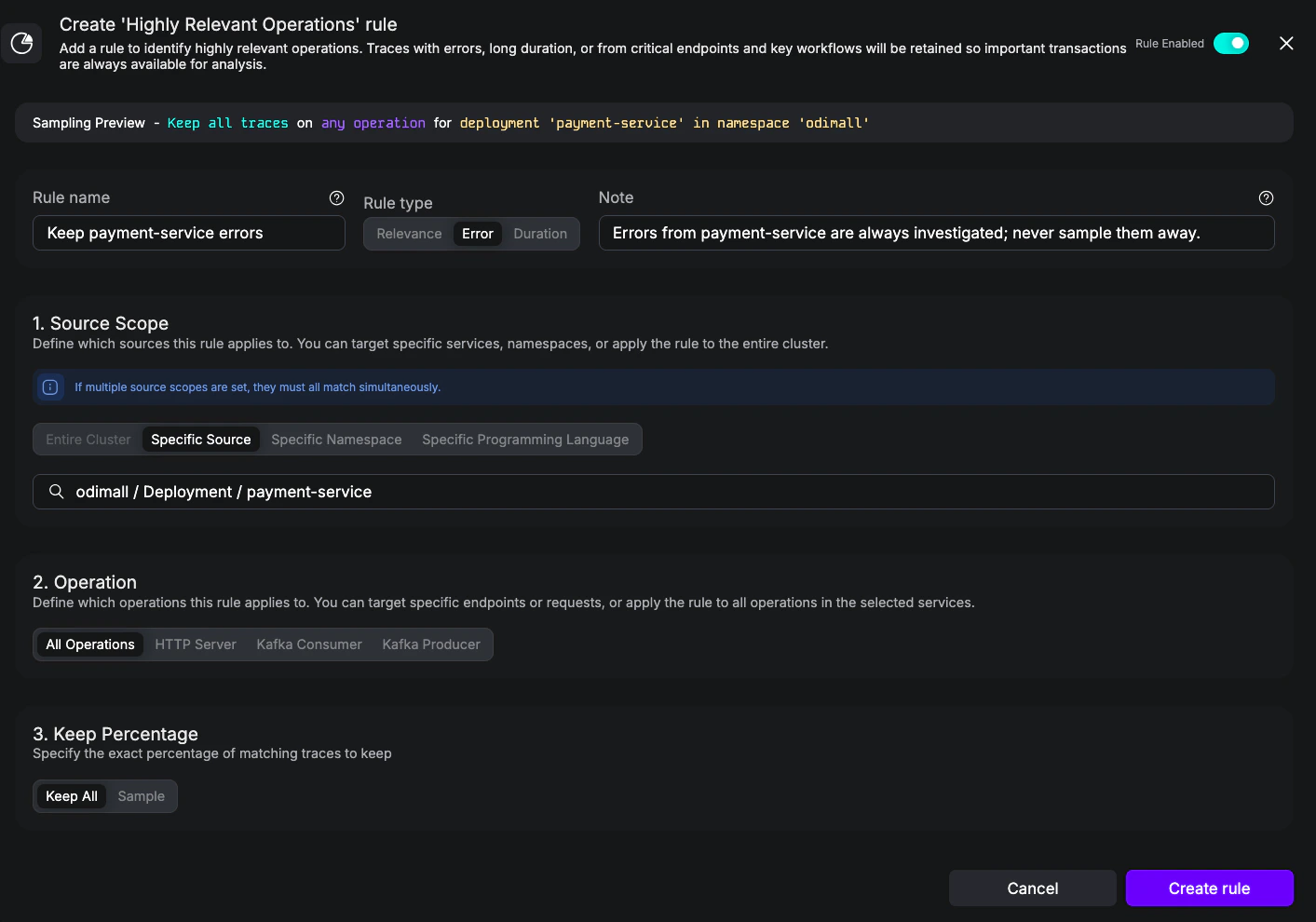
Highly Relevant rule keeping 100% of error traces from payment-service.
- Name:
payment-service 1% cap - Notes:
Cap healthy payment-service traffic to keep cost in check; HR errors above always win. - Source scope: Specific Source =
odimall / Deployment / payment-service - Operation: All Operations
- Drop Percentage: 1%
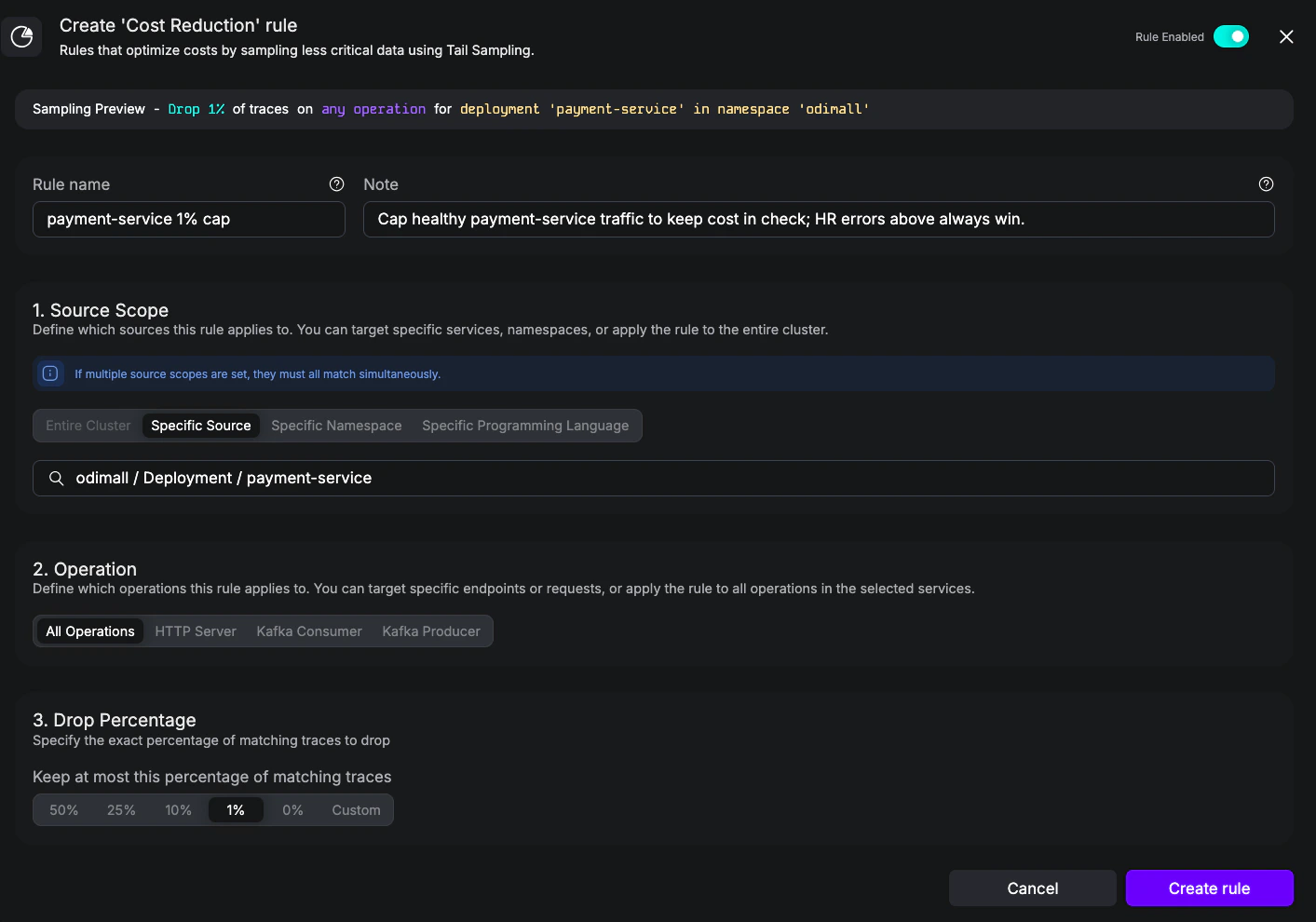
Cost Reduction rule capping payment-service traffic at 1%.
payment-service that contains any error span is kept at 100% by the Highly Relevant rule. A trace with no errors falls through to the Cost Reduction cap of 1%. Both rules are evaluated for every matching trace; Highly Relevant’s keep percentage wins when both apply. See Evaluation between Highly Relevant and Cost Reduction.6. Drop noisy gRPC health checks
Goal: Drop standard gRPC liveness/readiness checks (grpc.health.v1.Health.Check, Watch, …) on the inventory Deployment. This is the gRPC counterpart of Example 1, and shows how setting service alone scopes a rule to every method of a whole gRPC service.
YAML reference notes
A few details that aren’t obvious from YAML alone but matter when authoring rules. The full schema—every field, type, and validation rule—is in theSampling API reference.
Source scope: language enum and workloadKind casing
Source scope: language enum and workloadKind casing
workloadLanguage uses lowercase identifiers: java, python, go, dotnet, javascript, php, ruby. The UI displays the friendly names (Java, Python, Go, .Net, NodeJS, PHP, Ruby).workloadKind must match the Kubernetes resource kind exactly (case-sensitive PascalCase): Deployment, StatefulSet, DaemonSet, Job, CronJob. Lowercase or pluralized values will silently fail to match.Defaults when fields are omitted
Defaults when fields are omitted
sourceScopesempty or absent — the rule matches every source.operationomitted — the rule matches every operation in the scope.- Noisy
percentageAtMostomitted — defaults to 0% (drops everything). - Highly Relevant
percentageAtLeastomitted — defaults to 100% (keeps everything). - Cost Reduction
percentageAtMost— required. There is no default; the resource will fail validation if the field is absent.
HTTP matchers: route, method, and templated paths
HTTP matchers: route, method, and templated paths
- On HTTP Server matchers, set either
route(exact match) orroutePrefix(prefix match)—not both. Both match the framework’s templated path (e.g.,/users/{id},/users/:id,/users/*), not the resolved URL. methodis a free-form string in YAML. The UI restricts it to GET, POST, PATCH, DELETE, and PUT, but YAML accepts any method (e.g., HEAD, OPTIONS). Leave it empty to match any method.- HTTP Client matchers (Noisy only) use
templatedPath/templatedPathPrefix—the framework’s parameterized path (e.g.,/users/{id}), not the resolved URL (e.g.,/users/42). Match against the route as your HTTP library reports it.
gRPC matchers: service and method are independent fields
gRPC matchers: service and method are independent fields
servicematches the fully-qualified gRPC service name (e.g.,acme.inventory.v1.InventoryService,grpc.health.v1.Health);methodmatches the bare method name (e.g.,ListItems,Check). Both fields are exact match and case-sensitive, mirroring proto naming.- The canonical “drop every call to this service” rule is one line: set
serviceand leavemethodempty. To target a single RPC, set both. To match every gRPC call regardless of service, leave both empty. - Both OpenTelemetry semconv conventions are supported transparently: the older split form (
rpc.service+ barerpc.method) and the newer fully-qualified form (rpc.method="Service/method", withrpc.servicedeprecated). For the latter the matcher splitsrpc.methodon the first/to derive the service/method, so the same rule matches spans from agents on either version. - The
rpc.*attribute namespace is shared with other RPC frameworks (Apache Dubbo, Connect RPC, JSON-RPC, .NET WCF, Java RMI, ONC RPC). The matcher readsrpc.system/rpc.system.nameand, when present, only matches spans whose system equals"grpc"; non-gRPC RPC spans never accidentally fire a gRPC rule. Spans that omitrpc.systementirely are still considered (permissive default for older instrumentations). - A span must carry at least
rpc.serviceorrpc.methodto be considered a gRPC span; rules on an attribute that can’t be derived from the span will not match (e.g. aservice:rule against a span whose only RPC attribute is the bare-methodrpc.methodor the_OTHERsentinel). - gRPC Client matchers (Noisy only) additionally support
serverAddressfor matching the remote host (the gRPC channel target). Leave it empty to match any address.
Kafka matchers: empty topic matches all topics
Kafka matchers: empty topic matches all topics
kafkaTopic empty on a kafkaConsumer or kafkaProducer matcher matches every topic for that direction. Set the topic explicitly to scope a Kafka rule to a specific stream.Highly Relevant: combining error and durationAtLeastMs
Highly Relevant: combining error and durationAtLeastMs
error: true and durationAtLeastMs on a single highlyRelevantOperations item is an AND—the span must be an error and longer than the threshold to match. For “errors or slow,” use two separate items in the highlyRelevantOperations array.name and disabled surface in observability data
name and disabled surface in observability data
name is written as a metric attribute and stored as a span attribute on participating spans, so use a value that’s safe for dashboards and queries—avoid PII or characters your backend doesn’t index well.disabled: true on a rule removes it from sampling decisions but still emits metrics for it. That’s useful for tuning a rule and observing its would-be impact before re-enabling it, rather than deleting it outright.Applying YAML rules
You can apply any of the YAML examples above withkubectl, or commit them to your GitOps repository alongside the rest of your Odigos configuration:
Sampling resource is a self-contained group of rules. You can split rules across multiple Sampling objects—by team, environment, or use case—and they will be joined together to form the global sampling policy.
Disabling a rule
To take a rule out of sampling decisions without deleting it, you can either flip the toggle in the UI or setdisabled: true in YAML. Disabled rules still emit sampling metrics, so you can observe what the rule would have done before re-enabling it—useful as a “soft delete” while tuning, rather than removing the rule outright. See Enabled for when to reach for this versus deleting the rule.
- UI
- YAML
Sampling object continue to apply.
Rule Enabled — toggle on, the rule is included in sampling decisions.

Rule Disabled — toggle off, the rule is excluded but still emits metrics.